


Retro Games (Arcade)
4.41.23K Reviews
App Specs
- Version
- 1.2.2
- Updated On
- License
- Free
- Downloads
- 1,000,000+
- Developer
- Sahlaoui Mustpha
- Categories
- Arcade
- Platform
- Android
Screenshots
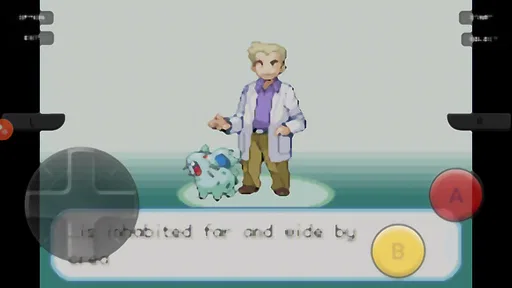
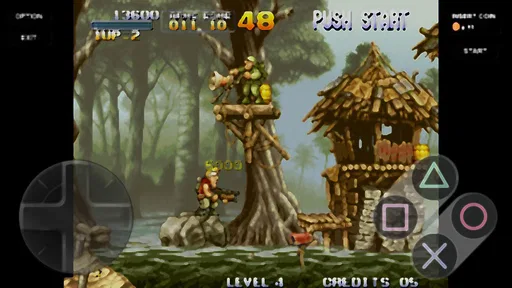
 Analysis by AppCompare
I’d approach Retro Games (Arcade) as a pocket-sized way to explore old-school arcade play, not as a guarantee that every game I remember will be there. It’s a free arcade game from Sahlaoui Mustpha, with a 4.5 average from around 14,000 ratings and over a million installs. That gives a new player a useful sense of its reach, but the best reason to try it is simpler: the premise is easy to understand, and you can find out quickly whether this style of gaming still clicks for you.
What to expect from a retro arcade collection
The app is aimed at people who enjoy short, direct challenges: move, react, avoid danger, and try again. That makes it a different kind of break from a story-heavy mobile game. You don’t need to set aside a long session or remember a complicated plot; the appeal is getting into a game and concentrating on what is happening on screen.
One useful expectation to set is that “retro” describes the style and purpose, not necessarily a promise of a perfect recreation of a specific childhood arcade. If you’re looking for one exact title, check what is actually available in the in-app library before building your plans around it. If you’re happy to browse and try a few arcade-style options, the collection format is more appealing: it gives you room to discover something familiar or find a quick new favorite.
That distinction matters when comparing it with the usual alternatives. A single-game mobile release may give you a more focused presentation of one classic, while a general emulator can involve more setup and decisions before you play. This app’s stated identity is an arcade emulator, so its draw is the possibility of keeping retro play in one place. I’d choose it for casual browsing and short sessions; I’d choose a dedicated release if I cared most about one particular game’s exact controls or presentation.
From install to your first satisfying session
Getting started should feel low-pressure. The game is free to download, is rated Everyone, and supports Android 6.0 or later. Once it’s installed, open it with one simple goal: find an available game that looks approachable and spend a few minutes learning its rhythm. Trying to master the whole collection immediately is less useful than getting comfortable with one control layout first.
For a first session, I’d play somewhere with enough screen space to hold the phone steadily, rather than walking or juggling other tasks. Arcade games often ask for quick reactions, and even a small distraction can make a touchscreen feel less accurate. Start with a short attempt, notice which on-screen areas handle movement and actions, then repeat with your thumb placed comfortably. That small adjustment can matter more than rushing into a harder challenge.
The first meaningful success doesn’t have to be a high score. It can be simply reaching a point where the controls feel predictable and you understand what the game is asking you to do. If one title feels awkward, switch to another rather than deciding the whole app is a poor fit. Different arcade styles can demand different timing, and a comfortable first pick makes the learning curve much friendlier.
Worth Reading Before You Choose

EA SPORTS FC Mobile 26 Is a Bigger Football Game, but It Takes Time

Flipboard Shows What News Apps Must Do Beyond the Feed

Switching to Android Auto Means Rethinking Your Driving Routine

Google Calendar Makes a Crowded Week Easier to Manage

Ludo King Makes the Most of the Minutes Between Plans

Baby Panda World Brings Quick Play to Modern Phones, but Its Game Library Feels Busy
Controls, expectations, and common snags
Touch controls are convenient because they let you play without carrying a controller, but they can’t reproduce the physical separation and click of arcade buttons. On a small screen, your thumb may cover part of the action, and quick directional changes can feel less precise than they would on a cabinet. I’d treat that as a real trade-off, not a flaw that every player will automatically enjoy.
A practical tip is to avoid changing your grip in the middle of a fast round. Settle the phone in your hands before starting, keep your movement thumb in a consistent spot, and use early attempts to learn how sensitive the controls feel. If you’re playing on a larger device, take advantage of the extra screen area; if you’re on a compact phone, shorter sessions can help reduce hand strain and make mistakes easier to diagnose.
New players may also confuse the familiar look of an arcade game with modern mobile conveniences. The point here is the direct, old-school challenge, so don’t expect every session to include tutorials, story guidance, or a gentle progression system. If you prefer games that explain every objective and steadily introduce mechanics, a contemporary arcade title may suit you better. If trial and error is part of the fun, the retro approach can be refreshing.
Who it suits, and when I’d pick something else
I can see this working well for someone who wants a quick game while waiting for a ride, taking a short break, or sharing a nostalgic moment with a friend or family member. For a realistic everyday use, imagine having a few spare minutes before an appointment: open the app, choose a game, play a brief round, and put the phone away without needing to resume a long campaign later. It also gives parents and older relatives an easy starting point for comparing the simple arcade challenges they remember with the games younger players enjoy now.
It’s less suited to someone who needs a carefully curated collection of named classics, wants console-level control precision, or mainly plays games with long-term goals and detailed progression. For those needs, a dedicated version of a particular game, a controller-friendly option, or a more modern arcade game may be a better choice. The app is most convincing when you value convenience and variety over a guaranteed one-to-one recreation of a favorite cabinet.
There are a couple of useful ways to make the experience more deliberate. Rather than hopping between games after every mistake, give one title a few attempts so you can tell whether the challenge is becoming clearer. Then switch if the controls or pace still don’t suit you. Also, treat scores as a personal benchmark rather than proof that you’ve mastered the collection: a tiny improvement in timing can be a satisfying win even if you’re nowhere near a record.
The game is free, with in-app purchases listed at $3.99 per item. I’d begin without spending anything and decide first whether the available games and touch controls are a good match. If you’re considering a purchase, check what the item offers in the app and whether it solves a problem you actually have; paying for something is only worthwhile if it improves the way you want to play.
For people wondering whether it is suitable for younger players, its Everyone age rating makes it broadly accessible, and the simple arcade format is easy to demonstrate. I’d still suggest trying it together at first: that gives you a chance to see how a child handles the controls and whether the pace is enjoyable. For adults revisiting arcade play, the same first session is a good way to find out whether nostalgia holds up on a touchscreen.
The app was released on January 23, 2025, and its current version is 1.2.2. Those details are useful when checking that you have the version you intend to use, while the minimum Android requirement means older devices may not be able to install it. The developer is Sahlaoui Mustpha. Taken together, the practical decision is straightforward: try it if you want an accessible arcade-style diversion, and keep your expectations flexible about the exact games and feel.
If you enjoy learning a game through quick attempts, you’ll likely understand the appeal within your first short session. If you find yourself wishing for physical buttons, deeper guidance, or a specific classic, there’s no need to force it; another format will probably serve you better. I’d recommend giving this collection a fair, low-pressure try, starting with one approachable game and letting the controls—not just the nostalgia—decide whether it earns a place on your phone.
Blast from the Past
First off, Retro Games (Arcade) feels like a treasure chest filled with pixelated gems. Remember the excitement of guiding a little yellow dot through a maze, gobbling up dots while dodging ghosts? This app brings all that back. It’s practically got every game you remember, from the iconic space shooters to those frantic platformers.
The interface is pretty straightforward. You open the app, and bam, you’re greeted with a library of games. Just tap on your favorite, and you’re instantly transported back to simpler times. What I love about the app is that it doesn’t try to do too much. It’s simple, it’s clean, and it’s all about letting you dive into the action without any fluff.
Gameplay and Controls
The gameplay is as authentic as it gets. The developers have done a stellar job of capturing the original feel of the games. The controls might take a little getting used to, especially if you’re used to physical joysticks and buttons. However, the touchscreen controls are surprisingly responsive. You’ve got your virtual joystick on the screen and a couple of buttons. It’s pretty intuitive, and once you get the hang of it, you’ll be blasting through levels like it’s 1985 all over again.
One thing to note is that some games can be a tad challenging without the tactile feedback of real buttons. But hey, that’s part of the fun, right? It adds an extra layer of challenge that can make victories feel all the more satisfying.
Graphics and Sound
Now, let’s talk about the graphics. This app doesn’t try to modernize or fancy up the visuals, and I’m here for it. The pixel art is just how you remember it: bright, colorful, and wonderfully retro. The sound effects and music are equally authentic. You know a game has done its job when the soundtrack gets stuck in your head for days. The beeps and boops are just as charming as they used to be, transporting you back to those noisy arcades.
Why You’ll Love It
So why should you download Retro Games (Arcade)? Well, if you’re looking to relive those golden days of gaming or introduce a new generation to the classics, this app is perfect. It’s a fantastic way to unwind and enjoy some good old-fashioned fun. Plus, there’s something incredibly gratifying about beating your high score or finally defeating that level boss you never could as a kid.
The app is also a fantastic way to connect with friends or family over shared memories. You can challenge them to beat your scores or just reminisce about the good old days. It’s a conversation starter, a time passer, and a nostalgia bomb all rolled into one.
Final Thoughts
In a world where games are getting increasingly complex, Retro Games (Arcade) is a breath of fresh air. It’s a reminder of how fun and engaging simple gameplay can be. Whether you’re looking to kill some time, relive childhood memories, or just enjoy some quality gaming, this app has got you covered. So grab your virtual quarters, hit the play button, and enjoy the arcade adventure!
Pros
- Nostalgic graphics bring back classic arcade vibes.
- Simple controls make it easy to pick up and play.
- Wide variety of retro games included.
- Offline mode available for uninterrupted play.
- Regular updates with new games and features.
Cons
- Some games may feel repetitive over time.
- Ads can be intrusive during gameplay.
- Limited advanced features for hardcore gamers.
- In-app purchases might be necessary for extras.
- No multiplayer mode available for social gaming.
FAQs for Retro Games (Arcade)
What platforms is Retro Games (Arcade) available on?
Retro Games (Arcade) is available for both Android and iOS platforms. The app is optimized for smartphones and tablets, allowing users to enjoy a seamless gaming experience across devices. Ensure your device meets the minimum system requirements for optimal performance before downloading.
Does Retro Games (Arcade) require an internet connection?
Retro Games (Arcade) can be enjoyed both online and offline. While an internet connection is not necessary to play the majority of the games, some features, such as leaderboards and social sharing, require connectivity. Offline play ensures you can enjoy your favorite games anywhere without interruption.
Are there in-app purchases in Retro Games (Arcade)?
Yes, Retro Games (Arcade) includes in-app purchases. While many games are free to play, certain features, such as ad removal, extra lives, or exclusive game content, may require a purchase. The app offers these to enhance your gaming experience, but they are entirely optional.
How user-friendly is Retro Games (Arcade) for beginners?
Retro Games (Arcade) is designed with a user-friendly interface that caters to both beginners and seasoned players. It includes easy-to-navigate menus, clear instructions, and helpful tutorials. This makes it accessible to users of all ages, even those new to retro gaming.
Is Retro Games (Arcade) safe for children?
Retro Games (Arcade) is generally safe for children. It features classic arcade-style games with simple, non-violent gameplay. However, parental supervision is recommended, especially regarding in-app purchases and online interactions. Always review the app’s content and settings to ensure they are appropriate for your child.


